
This tool is designed to extract as much of your desired files as possible from a damaged/corrupted (but still [barely] “functioning”) HDD / SSD / SD Card / Usb stick etc.
FREE – no strings attached. One day I discovered an 8-year-old SD Card with 128GB of photos from an old phone. In a drawer. I then realised this was never backed up!
I started backing it up and low and behold, within 10 minutes this thing was COOKED.
After researching – you cannot keep flash drives / usb sticks unpowered for years. The data on them Degrades over time!
Were my precious memories now gone? What could I get off the memory card? I had a LOT of files, and a LOT of 500MB+ videos on that thing, half of them failing to copy over.
I tried Robocopy, I tried multiple file extraction tools on Github / Internet. None of these worked well enough. All of them caused me pain and suffering. One even allowed attempting to backup the entire memory card as one big image – great – but then how do I get my stuff off that to be usable??
Here comes the best file extraction tool available – and its free. No matter how roasted your portable drive / usb stick / memory card is, as long as the file system can be recognised by your OS (Windows, Linux, Mac), then this software will mercilessly try to extract your data.
It will try to get virtually Every Byte of each file that it can. You can more or less rest assured the parts it can’t extract, are almost certainly gone forever – unless you’re perhaps the NSA or do data recovery for an actual living (and I bet you’ve got this tool in your repository if you are).
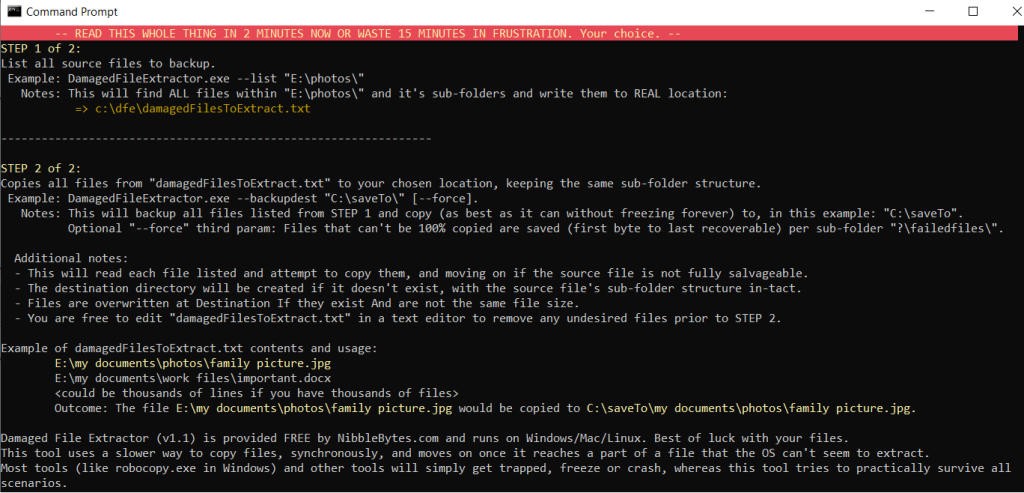
This is a command line tool. When you run the exe in Windows it will popup then disapear immediately. Type “cmd” in your start menu, and navigate to where-ever you choose to save the downloaded file too and run it there. A GUI is coming for it in future. For now, be blessed that you can run this via your keyboard.
Read the full instructions when you run the exe file itself! Trust me, it will take 90 seconds but set you up for success.
Share the tool with your friends and favourite platform
DOWNLOADS
Download Damaged File Extractor for Windows version 1.1. Released July 2026.
It is completely FREE. Works on most Windows versions.
Download Damaged File Extractor for Apple MacOS version 1.1. Released July 2026.
It is completely FREE. Works on most MacOS / OSx versions.
Download Damaged File Extractor for Linux. Released July 2026.
It is completely FREE. Works on Ubuntu and other distro’s. This is a statically linked binary that does not require extra libraries or setup. If you have any issues please report via the contact us page.
Note: If you get some non-sense about anti-virus – it is a lie – I crammed all the libraries this tool needed into a single .exe file for your convenience – and some anti-virus (looking at you Avast) thinks its suspicious. It’s not. Nothing to install, just run the tool.
Like this tool? Please feel free to share it on your favourite social media platform so others can recover their data.
Check out the FAQ page for some deeper dive details.
I don’t really do support for this tool but if you are genuinely stuck (and I don’t mean “how do I run it” – you’ll have to youtube “running a command line app on Windows/Mac” for that basic level info), then you can contact me on the contact page.